AI Lead Routing: How to Automatically Send Every Lead to the Right Next Step
Learn how AI lead routing works, which signals should control routing, how to design rules and human handoffs, and how to move each lead to the right owner, workflow, or next step.
 Written by Dylan StottFounder of Kinetic AI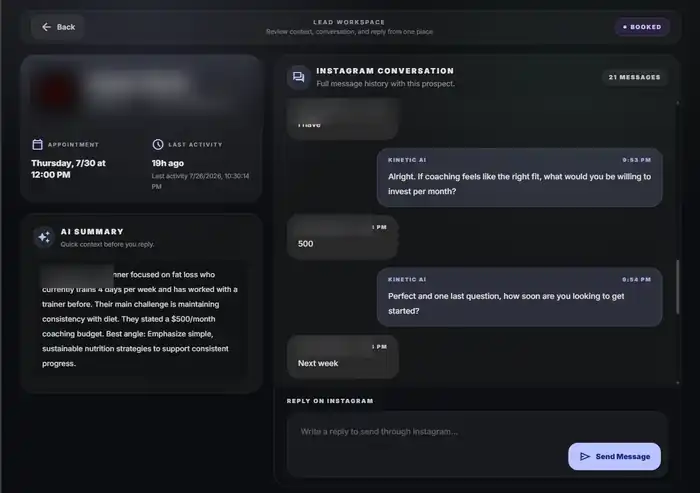
AI lead routing is the use of automation and artificial intelligence to decide where a lead should go after the business has enough context to act. Instead of sending every inquiry to the same inbox, salesperson, calendar, or nurture sequence, the routing layer sends each lead toward the next step that best matches its situation.
That next step may be a sales representative, a booking page, a future follow-up sequence, a support team, a specialist, a human review queue, or no sales action at all. The point is not to make routing more complicated. The point is to stop qualified opportunities from getting lost between lead capture and the person or process that should handle them.
The strongest routing systems combine simple deterministic rules with AI only where interpretation is useful. Geography, customer status, service availability, and owner assignments are usually better handled with explicit rules. Free-form messages, unclear intent, and conversational context are where AI can add more value.
What is AI lead routing?
AI lead routing is a decision layer that uses lead data, qualification context, business rules, and sometimes AI interpretation to send an opportunity to the correct owner or workflow.
Routing happens after or alongside qualification. Qualification asks whether the lead fits and what kind of next step makes sense. Routing turns that answer into action by assigning ownership, triggering the right process, or moving the lead into the correct queue.
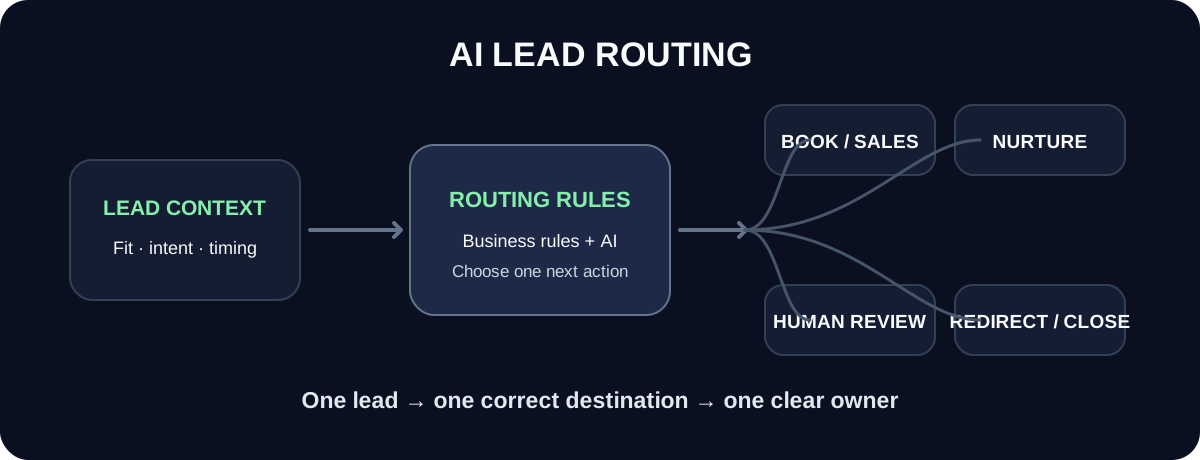
A useful routing system answers three questions clearly: where should this lead go, who owns the next action, and what should happen now?
The simplest routing model
A business does not need dozens of branches to benefit from routing. A small set of clearly defined outcomes is often enough.
- ✓Qualified and ready: move to booking, sales, estimate, demo, or checkout
- ✓Qualified but not ready: move to nurture or scheduled follow-up
- ✓Needs judgment: send to a human review queue with context
- ✓Existing customer: route to support, account management, or the current owner
- ✓Poor fit: redirect, refer, or close the lead respectfully
- ✓Missing information: return to qualification rather than guessing the route
Why lead routing matters
Lead generation only creates value if interested people reach the correct next step. A business can respond quickly and qualify accurately but still lose opportunities if the routing layer is weak.
Common routing problems include leads sitting unassigned, the wrong employee receiving the inquiry, multiple people contacting the same prospect, good leads entering a generic nurture flow, existing customers being treated like new prospects, and salespeople receiving opportunities they cannot actually serve.
Routing fixes the handoff between information and action. It gives each lead one clear destination and one clear owner instead of relying on someone to notice the record and decide manually every time.
AI lead routing is not the same as lead qualification
Qualification and routing are connected, but they should not be treated as the same job.
Qualification determines whether the lead fits, how ready the opportunity is, and what type of next step makes sense. Routing takes that decision and sends the lead to the correct person, calendar, queue, or workflow.
For example, qualification may determine that a prospect is a strong fit for a consultation. Routing then decides which consultation type to offer, which salesperson should own the lead, or whether the prospect should book directly instead of waiting for manual outreach.
AI lead routing is not the same as lead scoring
A lead score can influence routing, but it should not automatically replace routing logic.
Scoring helps rank or prioritize leads. Routing determines the destination and owner. A high-value lead might receive priority inside a sales queue, but the business still needs to know which queue, team, product line, territory, or workflow the lead belongs in first.
Use a score as one signal when it helps. Do not make every routing decision depend on a single opaque number if clear business rules can determine the correct destination more reliably.
The routing signals that matter most
The right routing signals depend on the business. A local service company, SaaS company, fitness coach, and multi-location clinic may all use different criteria. The useful rule is to route on information that genuinely changes who should act or what should happen next.
- ✓Lead status: new, qualified, customer, former customer, partner, or non-sales inquiry
- ✓Need or use case: what problem or service is the lead asking about?
- ✓Product or service fit: which offer can actually solve the request?
- ✓Geography or territory: where is the lead located or where will service happen?
- ✓Timing: is the opportunity immediate, future, or exploratory?
- ✓Commercial value: does project size or account potential affect ownership?
- ✓Account ownership: is there already a salesperson, account manager, or partner assigned?
- ✓Channel: did the inquiry come from Instagram, a form, email, referral, chat, or another source?
- ✓Availability and capacity: which team or calendar can realistically handle the next step?
- ✓Risk or complexity: does the lead require specialist or human review?
Start with deterministic rules where the answer is objective
Not every routing decision needs AI. If the answer can be determined by a stable business rule, ordinary automation is usually easier to explain, test, and maintain.
For example, a lead in Colorado should not be sent to the Arizona-only service team because an AI model thinks the conversation sounds similar. A current customer should not enter a new-prospect sales sequence if the CRM already identifies the person as a customer.
Use explicit logic for facts the business can validate directly. Save AI for the parts of routing that require understanding language or context.
- ✓State or service-area eligibility
- ✓Product selected on a form
- ✓Existing account owner
- ✓Customer versus prospect status
- ✓Calendar or location availability
- ✓Language preference when explicitly provided
- ✓Known plan, package, or account tier
Use AI where the lead's intent is buried in normal language
AI becomes useful when the route depends on interpreting what the lead means instead of reading one clean field.
A message such as 'I already use your software, but I need help adding two locations before next month' contains several signals at once: the person is an existing customer, the request is expansion rather than new acquisition, the timing is near-term, and the right owner may be account management instead of a new-business salesperson.
AI can extract those signals, summarize the request, and recommend a route. The final route can still be constrained by approved business rules so the model cannot send the lead somewhere that does not exist.
A practical AI lead routing workflow
A dependable routing workflow separates understanding from execution. The system first collects the lead context, then classifies what matters, checks the business rules, assigns the correct next step, and confirms that ownership was actually accepted.
- ✓1. Capture the inquiry and existing customer or CRM context
- ✓2. Identify intent, fit, timing, location, and other routing signals
- ✓3. Apply hard business rules and exclusions
- ✓4. Select the correct destination or next action
- ✓5. Assign one owner or queue
- ✓6. Pass the useful context with the handoff
- ✓7. Start the next workflow immediately
- ✓8. Monitor whether the lead was accepted, contacted, booked, or rerouted
The main types of lead routing
Most routing systems use one or more of a few common patterns. The right model depends on whether the business cares most about expertise, geography, account ownership, speed, capacity, or fairness across a team.
- ✓Territory routing: assign by geography, market, or location
- ✓Product routing: assign by the service, plan, department, or use case
- ✓Skills-based routing: send the lead to someone with the right expertise
- ✓Account-based routing: preserve an existing account or relationship owner
- ✓Round-robin routing: distribute similar leads fairly across eligible reps
- ✓Capacity routing: send the next lead to the eligible person or team with availability
- ✓Priority routing: move high-value or time-sensitive opportunities ahead of ordinary leads
- ✓Lifecycle routing: separate prospects, customers, renewals, support, partners, and other relationship states
Round robin works only after eligibility is clear
Round-robin assignment is useful when several people can handle the same kind of opportunity. The common mistake is using round robin before the system has confirmed which people are actually eligible to receive the lead.
A better sequence is to filter the eligible group first, then distribute within that group. That means checking territory, product knowledge, customer ownership, language, schedule, or other important constraints before rotating the lead.
Fair distribution is useful only when the assignments are also correct.
Capacity-based routing can reduce dead ends
A lead can be routed to the technically correct person and still wait too long if that person has no capacity. Capacity-based routing adds current availability to the decision.
This can be simple. A business may route direct-booking leads to calendars with available appointment slots, distribute leads away from representatives who are out of office, or temporarily pause assignments to a team that has reached its limit.
Capacity should not override important ownership or expertise rules without a clear fallback. The system needs an ordered set of priorities rather than a collection of rules that can contradict each other.
Create an explicit rule priority order
Routing systems become unreliable when several rules apply at once and the business has not decided which rule wins.
Suppose a lead belongs to an existing account owner, lives in a different territory, requests a specialized product, and has a high score. The system needs a documented order of operations instead of letting whichever automation runs first decide the owner.
A typical priority order may place customer ownership and hard eligibility first, then product or skill requirements, then territory, then capacity, then round robin or score-based prioritization. The exact order should match the business.
Every route needs one owner and one next action
A route is incomplete if it only changes a CRM stage. Someone or something still needs to own the next action.
For a direct-booking route, the system itself may own the next action by offering the correct calendar and tracking whether the appointment is scheduled. For a human-review route, a named person or queue needs responsibility for reviewing the lead. For nurture, the workflow needs a defined future follow-up event rather than an indefinite 'not ready' status.
Avoid shared ownership where everyone can see the lead but nobody is accountable for moving it forward.
The handoff packet matters as much as the route
Sending a lead to the right person is only half the job. The person receiving the lead needs enough context to continue without forcing the prospect to repeat the entire conversation.
A good handoff packet summarizes what the lead wants, why the lead was routed there, what qualification criteria were met, what remains unclear, the recommended next action, and the original source conversation or form data.
AI can help create the summary, but the original evidence should remain accessible so the employee can verify the interpretation.
- ✓Lead name and source
- ✓Stated goal, request, or problem
- ✓Relevant qualification signals
- ✓Why this owner or workflow was selected
- ✓Timing or urgency
- ✓Open questions or unusual details
- ✓Recommended next action
- ✓Link to the original conversation, form, email, or lead record
Human review is a valid route
Some opportunities should not be forced into an automatic yes-or-no path. If the lead is valuable, unusual, ambiguous, sensitive, or outside normal policy, human review may be the correct destination.
The routing system should know which situations trigger review and who owns that queue. It should also preserve the context that made the situation uncertain.
A human-review route is better than an AI model inventing a policy exception or rejecting a potentially valuable opportunity because it does not fit a normal pattern.
Routing should distinguish prospects from existing customers
One of the simplest improvements is checking relationship status before starting a sales workflow.
An existing customer asking for help, an account expansion, a billing question, and a brand-new prospect should not all receive the same qualification flow. The CRM or account database should be checked early enough to prevent duplicate outreach and poor customer experiences.
If identity is uncertain, route to clarification rather than assuming the person is new.
Lead routing inside a CRM
A CRM is often the best place to preserve routing state because it can connect the lead, owner, stage, next action, and outcome in one record.
The routing engine may assign the owner, update the status, create a task, trigger a workflow, notify the team, or change the calendar or queue the lead sees. The important part is that routing remains visible after the automation runs.
If the lead is reassigned, record why. Frequent manual reassignment is useful evidence that the routing logic needs improvement.
Related reading
Lead routing to appointment scheduling
For many service businesses, the correct route for a qualified and ready lead is a specific appointment rather than a salesperson's inbox.
The routing layer should decide which appointment type is appropriate, whether direct booking is allowed, and which calendar or location should receive the booking. It should not simply expose every calendar the business has.
If the lead is not ready or the situation requires judgment, route to follow-up or a human instead of forcing booking.
Lead routing to nurture and follow-up
Not every good lead should be pushed into an immediate sales conversation. Timing is part of routing.
A strong-fit prospect who says the project starts next quarter may need a future follow-up instead of a meeting today. A lead still researching may need education. A prospect who stopped replying during qualification may need a different follow-up path from someone who explicitly said to contact them in three months.
Nurture should therefore be treated as a defined route with a reason, owner, and next date, not as a place where uncertain leads disappear.
Related reading
Do not route on data you do not trust
Automation can make bad data move faster. If important fields are stale, duplicated, inferred incorrectly, or missing, routing decisions can become confidently wrong.
Use validation for critical facts, define a fallback for missing data, and avoid relying on fields that nobody maintains. If a territory field is regularly outdated, fix the data process before making territory assignment fully automatic.
AI can help interpret messy information, but it should not hide a broken source-of-truth problem.
Avoid routing loops and automation conflicts
A lead should not bounce endlessly between workflows because each automation reacts to the other system's update.
Define which system owns each routing decision, which statuses can trigger reassignment, and which events should be ignored after an owner accepts the lead. Use clear terminal states so the same record does not re-enter the top of the routing logic every time a field changes.
The more systems involved, the more important it is to document the source of truth for owner, stage, and next action.
A worked B2B routing example
Imagine a software company receives a website inquiry from an operations director at a 300-person manufacturer. The message says the company wants to replace a manual scheduling process and needs the new system evaluated before its January planning cycle.
The qualification layer identifies a real use case, relevant company fit, decision timing, and a request that belongs to the enterprise product. The routing layer then checks whether the account already has an owner, selects the enterprise sales team, uses territory rules to choose the eligible group, and assigns the lead based on capacity.
The receiving representative gets the original form, an AI summary of the problem and timing, the reason the lead was routed to enterprise, and a task with the expected next action. The lead does not sit in a general inbox waiting for someone to notice it.
A worked local-service routing example
Imagine a home-services company receives an inquiry that says, 'Our furnace stopped working this morning and we're in Fort Collins.'
The route should not depend on a generic lead score. The system can identify the request as an urgent repair, validate that Fort Collins is inside the service area, check which branch handles that address, and move the lead directly into the emergency-service scheduling or dispatch path.
If the address is outside the service area, the correct route may be a referral or polite decline rather than a sales call. If the message describes a dangerous condition, the system should follow the business's safety escalation policy rather than treating it as an ordinary booking request.
A worked online fitness coaching routing example
An online fitness coach may have fewer owners, but routing still matters. A new Instagram lead who is a strong fit and ready to discuss coaching can move toward a consultation. A current client asking a program question should leave the prospect flow. A lead who is interested but not ready may enter a future follow-up path. A sensitive health question should be handed to the coach instead of answered as a sales qualification step.
The routing system is simpler than an enterprise sales organization, but the principle is the same: understand the situation, select the correct next action, and preserve the context.
How Kinetic AI handles the routing step
Kinetic AI applies routing to a narrow workflow: inbound Instagram leads for personal trainers and online fitness coaches.
The system keeps the Instagram conversation, qualification context, AI summary, lead status, and booking outcome connected. When a prospect reaches the appropriate point in the conversation, the system can send the coach's connected booking link and track whether a call is scheduled. When the situation should stay with the coach, the context remains available for human takeover.
Kinetic AI is not a generic enterprise territory-routing platform. Its value is in routing fitness-coaching conversations through the specific path from inbound DM to qualification, booking, follow-up, or human involvement without forcing the coach to manage every step manually.
Related reading
How to measure lead routing performance
Routing performance should be measured by whether leads reach the correct next action quickly and stay correctly owned afterward.
Do not judge the system only by how many automatic assignments it makes. A routing engine that assigns every record instantly but creates constant manual corrections is not working well.
- ✓Unassigned lead rate: percentage of leads with no clear owner or workflow
- ✓Time to route: time from inquiry or qualification to assignment
- ✓Time to first owner action: time from routing to meaningful follow-up
- ✓Routing acceptance rate: percentage of assigned leads accepted without correction
- ✓Reassignment rate: percentage manually moved to another owner or queue
- ✓Routing error rate: leads sent to an ineligible person, team, service, or workflow
- ✓Qualified lead to next-step conversion: whether routed leads actually complete the intended action
- ✓Human-review rate: useful for spotting rules that are too vague or too strict
- ✓Orphan rate: leads that entered a workflow but received no completed next action
Audit manual reassignments
Manual corrections are one of the best sources of routing feedback. Every reassignment reveals a difference between the automation's rule and the team's real decision.
Review the reason for each correction. The business may discover a missing eligibility rule, stale territory data, an unclear service category, an overloaded team, or a lead type that deserves its own route.
Do not simply allow employees to fix mistakes silently. Capture the reason so the routing logic can improve.
A practical implementation sequence
Start small. Automate one routing decision that already has a clear manual rule, verify that it works, then add more complexity only when the additional branch solves a real problem.
- ✓Map the current destinations a lead can enter
- ✓Define the minimum routing signals for each destination
- ✓Separate hard business rules from AI interpretation
- ✓Define rule priority and conflict resolution
- ✓Assign one owner or workflow to every outcome
- ✓Create a fallback for missing or ambiguous information
- ✓Design the handoff packet before automating assignment
- ✓Test new prospects, customers, poor-fit leads, edge cases, and conflicting-rule scenarios
- ✓Track reassignments and orphaned leads after launch
- ✓Add new routes only when the existing system cannot handle an important recurring case
Common AI lead routing mistakes
Most routing failures come from unclear ownership, conflicting rules, unreliable data, or using AI where a simple rule would be safer.
- ✓Routing every lead to the same generic sales queue
- ✓Using lead score as the only routing signal
- ✓Running round robin before checking eligibility
- ✓Ignoring existing customer or account ownership
- ✓Letting several automations compete to assign the same lead
- ✓Failing to define which rule wins when criteria conflict
- ✓Sending the owner a lead with no useful context
- ✓Treating nurture as a dead-end status with no future action
- ✓Using AI to invent service availability, eligibility, or policy
- ✓Failing to measure manual reassignment and routing errors
- ✓Building dozens of routes before the business has enough lead volume to justify them
When AI lead routing is worth adding
Automated routing becomes valuable when the business receives enough leads that manual assignment creates delays, inconsistency, duplicate work, or ownership confusion.
It is especially useful when several teams or workflows can receive a lead, when conversational context affects the route, when leads arrive outside normal hours, or when the cost of sending a strong opportunity to the wrong person is meaningful.
If the business has one salesperson, one service, and only a handful of inquiries, a simple inbox or pipeline may be enough. The goal is not to automate routing for its own sake. The goal is to remove a real handoff bottleneck.
Final takeaway
AI lead routing is the bridge between understanding a lead and taking the right action. Qualification tells you what the opportunity is. Routing makes sure that information reaches the correct owner, workflow, calendar, or follow-up path.
The strongest systems use deterministic rules for objective facts, AI for interpretation where it adds value, a clear priority order for conflicting rules, one owner for every outcome, and a handoff packet that preserves the context behind the decision.
Keep the number of routes as small as possible, track where humans correct the automation, and optimize for correct next actions rather than the number of assignments the software can make.
Kinetic AI Software
See how Kinetic AI handles the repetitive work inside Instagram DMs
Kinetic AI helps online fitness coaches respond to inbound leads, qualify fit, follow up, send the right booking step, and keep the conversation organized without turning every DM into a rigid script.