Appointment Scheduling for Small Businesses: How to Turn More Qualified Leads Into Booked Appointments
A practical appointment scheduling system for small businesses covering qualification, booking friction, calendar setup, confirmations, reminders, no-shows, rescheduling, and conversion tracking.
 Written by Dylan StottFounder of Kinetic AI
Getting a qualified lead is only useful if the person can move into the next step without unnecessary friction. For many small businesses, that next step is an appointment, consultation, estimate, discovery call, site visit, or service booking.
This is where a surprising amount of demand gets lost. A prospect is interested, the business has already done the hard work of earning attention and trust, but the booking process is slow, confusing, inconvenient, or easy to abandon.
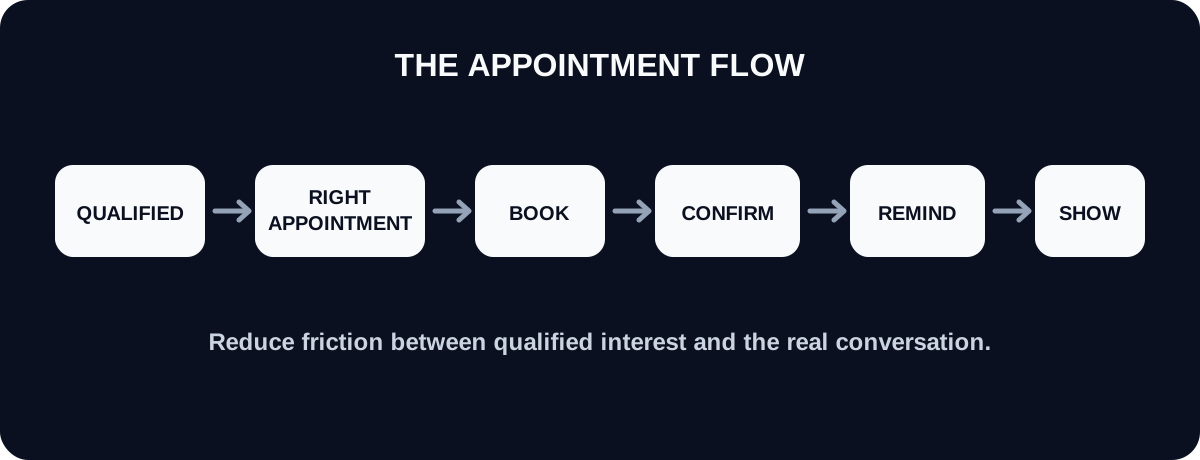
A strong scheduling system fixes that gap. It helps the right leads book the right appointment, at the right time, with the right person, while giving the business enough information to prepare and enough follow-up to reduce avoidable no-shows.
What appointment scheduling should accomplish
Appointment scheduling is not just putting available times on a calendar. It is the handoff between interest and a real sales or service interaction.
The system should make the customer's next step obvious while protecting the business from bad-fit bookings, double bookings, unprepared meetings, and calendar chaos.
- ✓Confirm that the lead is appropriate for the appointment
- ✓Match the lead with the right appointment type
- ✓Show realistic availability
- ✓Collect only the information needed before the meeting
- ✓Confirm the booking immediately
- ✓Remind the customer at useful times
- ✓Make rescheduling or cancellation clear
- ✓Track whether the appointment actually happened
Do not send every lead straight to the calendar
A booking link is useful when the lead is ready for it. It creates friction when it is sent too early.
If the business still needs to understand the problem, service area, project type, urgency, budget range, or another fit requirement, qualify that first. Otherwise the calendar fills with appointments that should never have been booked.
- ✓Book immediately when the service is standardized and the lead already meets the basic requirements
- ✓Qualify first when fit materially changes the next step
- ✓Ask for photos or documents first when scope cannot be understood without them
- ✓Route urgent or safety-sensitive situations to the appropriate human process instead of a generic booking page
- ✓Do not use the calendar as a substitute for answering simple questions
Use the shortest path from qualified lead to booked appointment
Once a lead is qualified, the next step should be simple. Every extra page, form field, channel switch, or unanswered question creates another place for the person to stop.
The ideal flow is usually: confirm fit, offer the appropriate appointment, let the customer choose a time, confirm the booking, and send the information they need to show up prepared.
- ✓Use one booking destination instead of several competing links
- ✓Preselect the correct appointment type when the system already knows what the lead needs
- ✓Avoid asking for information the lead has already provided
- ✓Keep required booking fields limited to information that changes preparation or delivery
- ✓Show the customer exactly what happens after they book
Choose appointment types based on the actual buying process
Different services require different meetings. A single generic calendar often creates bad expectations because the customer does not know whether they are booking a quote, consultation, service visit, or sales call.
Create appointment types around real business actions, not around internal team labels.
- ✓Consultation: for problems that require discussion before a recommendation
- ✓Estimate or site visit: for work that must be inspected before pricing
- ✓Discovery call: for complex B2B or professional services where fit and scope need deeper discussion
- ✓Service appointment: for standardized work that can be booked directly
- ✓Demo: for products or software where the customer needs to see the solution before deciding
- ✓Follow-up meeting: for proposals, reviews, or decisions that require another conversation
Make availability useful, not overwhelming
More appointment times do not always create more bookings. An overloaded calendar can make scheduling harder to scan and can create operational problems for the team.
Offer enough choice to feel convenient while protecting the time needed to deliver the appointment well.
- ✓Open only the hours when the correct team member can reliably take the appointment
- ✓Add buffer time when travel, preparation, cleanup, notes, or follow-up are required
- ✓Set a minimum notice period when same-hour bookings are unrealistic
- ✓Limit how far into the future customers can book when long-range availability is uncertain
- ✓Use separate calendars or routing rules when different services require different people
Booking links vs. manual scheduling
Both can work. The right choice depends on the complexity of the appointment and how predictable the business's availability is.
Self-scheduling is strongest when the appointment type, duration, qualification rules, and availability are clear. Manual scheduling is stronger when a person needs to coordinate travel, multiple staff members, custom resources, or unusual customer circumstances.
- ✓Use self-scheduling for repeatable appointment types with stable availability
- ✓Use assisted scheduling when several calendars or resources must be coordinated
- ✓Use manual review when booking the wrong slot could create a costly operational problem
- ✓Do not make customers trade five messages just to find a time when a reliable booking link could solve it instantly
What to ask on the booking form
The booking form should prepare the appointment, not repeat the entire sales process. Long forms create abandonment and make the customer feel like they are doing work before the business has provided value.
Ask for information only when it changes who should take the appointment, what should happen during it, or what the team needs to prepare.
- ✓Name and preferred contact information
- ✓The service or problem being discussed
- ✓Location when the appointment depends on geography
- ✓One short context question when it helps the team prepare
- ✓Relevant files, photos, or documents only when they are genuinely required
- ✓Any accessibility or logistical information needed to deliver the appointment
Confirmation messages should remove uncertainty
A booking confirmation should do more than say that the appointment exists. It should tell the customer when it is, where it is, what it is for, who is involved, and what to do next.
The less the customer has to search through old messages, the easier it is to follow through.
- ✓Date and local time
- ✓Appointment type and expected duration
- ✓Location, phone number, video link, or arrival instructions
- ✓Anything the customer should prepare beforehand
- ✓Clear rescheduling and cancellation instructions
- ✓A contact path for questions that cannot wait until the appointment
Use reminders to make attendance easier
Reminders work best when they reduce the chance of forgetting and make the next action easy. They should not feel like repeated pressure.
The right timing depends on the appointment type. A same-day service visit may need a short arrival reminder. A consultation booked two weeks ahead may need an earlier reminder plus a same-day confirmation.
- ✓Send an immediate confirmation after booking
- ✓Use a reminder far enough in advance that the person can still reschedule responsibly
- ✓Use a shorter reminder when the appointment is close
- ✓Include the essential appointment details again instead of making the customer hunt for them
- ✓Provide the reschedule link or instructions in the reminder
Reduce no-shows before trying to punish them
No-shows are not always a motivation problem. Sometimes the appointment was booked too far in advance, the customer forgot what it was for, instructions were unclear, reminders were weak, or rescheduling was harder than simply not showing up.
Before adding aggressive policies, make the appointment feel valuable and easy to manage.
- ✓Confirm what the appointment will accomplish
- ✓Keep the time between qualification and appointment as short as practical
- ✓Send clear reminders
- ✓Make rescheduling simple
- ✓Ask for confirmation when the business has a high-cost appointment or limited capacity
- ✓Use deposits or cancellation policies only when they fit the business model and are communicated clearly
Build rescheduling into the system
A customer who needs to move an appointment is usually better than a customer who disappears. The scheduling process should make it easy to preserve the opportunity when timing changes.
When rescheduling requires a phone call during business hours or a long email exchange, some customers will simply give up.
- ✓Give customers a clear way to move the appointment
- ✓Preserve the existing lead record and context when the time changes
- ✓Update reminders automatically after rescheduling
- ✓Track repeated reschedules separately from a single normal change
- ✓Return the opportunity to active follow-up when the customer cancels without choosing a new time
What to do when a qualified lead does not book
Sending a booking link is not the same as getting an appointment. If the lead was qualified and agreed that the appointment made sense, an uncompleted booking is still an open opportunity.
Follow up on the action that has not happened. Do not restart the entire conversation.
- ✓Confirm that the booking link worked
- ✓Ask whether the available times are the problem
- ✓Offer assisted scheduling when the customer is struggling to find a slot
- ✓Restate why the appointment is the appropriate next step
- ✓Close the loop respectfully if the person no longer wants to move forward
Connect appointment status to the sales pipeline
The calendar should not be a separate universe from the lead pipeline. A business needs to know which qualified leads were invited to book, which actually booked, which showed up, and what happened afterward.
Without those statuses, it is easy to mistake a scheduling problem for a lead-generation problem or a sales problem.
- ✓Qualified, not yet invited to book
- ✓Booking link sent
- ✓Appointment scheduled
- ✓Appointment confirmed
- ✓Rescheduled
- ✓Canceled
- ✓No-show
- ✓Appointment completed
- ✓Won, lost, or next sales step
Appointment scheduling metrics worth tracking
A few simple conversion rates can show exactly where the scheduling process is losing otherwise qualified demand.
Measure the stages separately. A low booking rate requires a different fix than a high no-show rate.
- ✓Qualified leads invited to book
- ✓Booking-link-to-booked-appointment conversion rate
- ✓Median time from qualification to booking
- ✓Median time from booking to appointment
- ✓Appointment confirmation rate when confirmations are required
- ✓Reschedule rate
- ✓Cancellation rate
- ✓No-show rate
- ✓Completed appointments
- ✓Appointment-to-customer conversion rate
How to diagnose where bookings are being lost
Do not respond to a weak appointment number by changing everything. Find the exact stage where the drop-off happens.
For example, imagine 100 qualified leads are invited to book. Sixty schedule, 48 show up, and 20 become customers. The first question is not whether the business needs more leads. It is whether 60% booking, 80% show-up, or 42% close rate after the appointment is the biggest opportunity relative to what is realistic for that business.
- ✓Low booking rate: inspect the CTA, calendar availability, form length, and whether booking was offered too early
- ✓Long delay to booking: inspect follow-up and availability
- ✓High cancellation rate: inspect appointment value, timing, and customer expectations
- ✓High no-show rate: inspect reminders, wait time, confirmation, and rescheduling friction
- ✓Low appointment-to-customer rate: inspect qualification, the appointment itself, offer fit, and sales process
What to automate
Scheduling is one of the strongest places to automate because many steps are predictable and administrative. Automation should remove repetitive coordination while preserving human judgment where it matters.
A reliable system can connect qualification, booking, reminders, and pipeline status so the team is not manually checking several tools all day.
- ✓Send the correct booking link after qualification
- ✓Create or update the lead's appointment status
- ✓Send confirmations and reminders
- ✓Notify the assigned team member of new bookings
- ✓Create follow-up tasks for qualified leads who do not book
- ✓Update the lead record when an appointment is rescheduled or canceled
- ✓Flag no-shows for the correct recovery process
- ✓Keep custom pricing, complex objections, unusual routing, and sensitive situations under human review
Examples by business type
The same scheduling principles apply across industries, but the appointment itself changes. Build the workflow around the real decision or service step.
- ✓Home services: qualify the job and service area, then schedule an estimate or service visit with realistic travel buffers
- ✓Professional services: confirm the basic matter and fit, then schedule the appropriate consultation with preparation instructions
- ✓B2B services: qualify the business problem and decision context, then book a discovery call with the correct decision-makers when possible
- ✓Health and wellness services: route the person to the correct appointment type and collect only the information needed before the visit
- ✓Consultants and agencies: confirm that the problem is in scope, then offer a focused strategy or discovery call instead of a generic meeting
A seven-day appointment scheduling cleanup
A small business can improve scheduling without replacing every tool. Start by removing friction and making statuses visible.
- ✓Day 1: list every appointment type the business currently books
- ✓Day 2: define who should and should not be allowed to book each type
- ✓Day 3: simplify calendar availability, buffers, notice periods, and form fields
- ✓Day 4: rewrite confirmations so every appointment has clear expectations
- ✓Day 5: create reminder and rescheduling rules
- ✓Day 6: connect appointment statuses to the lead pipeline and follow-up process
- ✓Day 7: begin tracking booking, show-up, and appointment-to-customer conversion rates
Where Kinetic AI fits
Kinetic AI applies this workflow to inbound Instagram leads for personal trainers and online fitness coaches. It can qualify the conversation, send the coach's connected Calendly link when the lead is ready, track whether a call was scheduled, and preserve the conversation context for the coach before the call.
The broader lesson applies to any small business: scheduling works best when the appointment is offered at the right moment, the booking process is easy, the lead's status is visible, and unanswered next steps are followed up consistently.
Final takeaway
A strong appointment scheduling system does not just fill a calendar. It converts qualified interest into a real next step with as little unnecessary friction as possible.
Qualify first when necessary, offer the correct appointment, keep booking simple, confirm expectations, remind at useful times, make rescheduling easy, and track what happens after the appointment. That gives the business a much clearer path from inquiry to customer.
Kinetic Growth Partnership
Build a more predictable online fitness coaching business
The Growth Partnership helps online fitness coaches identify the constraint limiting growth, build the missing strategy and systems around it, and review the numbers so the next priority stays clear.