AI Assistant for Online Fitness Coaches: What to Automate and What to Keep Human
A practical guide to using an AI assistant in an online fitness coaching business for content, DMs, lead qualification, client admin, check-ins, operations, and reporting without automating the judgment that should stay human.
 Written by Dylan StottFounder of Kinetic AI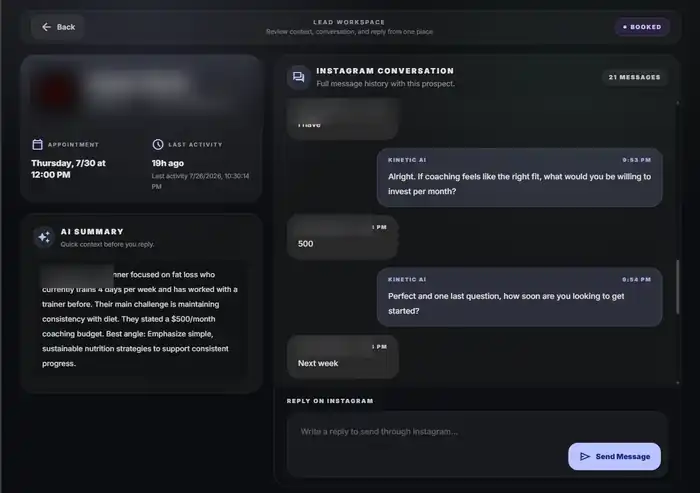
An AI assistant for an online fitness coach can do far more than write captions. It can organize information, draft content, summarize check-ins, prepare sales context, answer routine questions, qualify inbound leads, follow up, and reduce repetitive admin.
The mistake is treating all of those jobs as equally safe to automate. Some tasks are repetitive, easy to review, and low-risk. Others require professional judgment, empathy, health context, or a real understanding of the client that should stay with the coach.
This guide maps the useful roles AI can play across an online fitness coaching business, explains where an AI DM assistant fits, and gives you a practical way to decide what to automate first without turning the business into a pile of disconnected AI tools.
Quick answer: what should an AI assistant do for an online fitness coach?
The best use of AI is usually not replacing the coach. It is reducing the repetitive work around the coach's judgment.
A useful rule is: let AI collect, organize, draft, summarize, classify, and remind. Keep diagnosis, high-stakes health decisions, important relationship moments, offer strategy, and final coaching judgment human.
- ✓Create: research, outlines, repurposing, editing, and first drafts.
- ✓Convert: inbound DM response, lead qualification, follow-up, call preparation, and booking support.
- ✓Deliver: check-in summaries, pattern identification, draft responses, and administrative support around client service.
- ✓Operate: meeting summaries, SOP drafts, metric summaries, inbox organization, and recurring administrative work.
- ✓Keep human: judgment-heavy coaching decisions, sensitive conversations, scope-of-practice decisions, sales calls, and anything where a wrong answer could materially harm the client or relationship.
Kinetic AI operating map
Create → Convert → Deliver → Operate
Use AI where it reduces repetitive work around the coach's judgment, then keep high-stakes decisions and relationship-heavy moments human.
Research, draft, edit, and repurpose content.
Respond, qualify, follow up, prepare, and book.
Summarize check-ins and prepare coaching decisions for review.
Organize metrics, notes, SOPs, and recurring admin.
The goal is not maximum automation. It is less repetitive work without outsourcing the judgment that makes the coaching valuable.
What does 'AI assistant' actually mean?
The phrase is broad. An AI assistant can be a general tool you prompt manually, a feature inside coaching software, a specialized assistant connected to client data, or an automation that takes action in a channel such as Instagram.
That matters because the label alone tells you very little about what the system can safely or reliably do. A content-writing assistant and an AI DM assistant may both use generative AI, but they need different context, permissions, guardrails, and success metrics.
Treat 'AI assistant' as a job description. Define the job first, then choose the tool.
The four places AI can help an online fitness coaching business
Most useful AI work fits into four parts of the business: creating demand, converting demand, delivering the service, and operating the business.
Separating those jobs prevents one tool from becoming a vague solution to everything.
- ✓Create → content research, drafts, repurposing, editing, and planning.
- ✓Convert → DMs, qualification, follow-up, call preparation, booking, and lead summaries.
- ✓Deliver → check-in organization, adherence summaries, draft client messages, and administrative support.
- ✓Operate → metrics, notes, SOPs, recurring reports, inbox organization, and internal planning.
1. Content: use AI as an editor and research assistant, not your personality
AI is useful when content creation gets stuck on repetitive work: organizing ideas, turning a long video into shorter posts, comparing headline options, summarizing research, or editing a rough draft.
The weakest use is asking a model to create generic fitness content from nothing and publishing it unchanged. That tends to erase the coach's actual experience, language, and point of view.
Give the assistant real context: who you coach, the problems you repeatedly see, the way you explain those problems, examples of your writing, and the claims you will not make.
- ✓Research questions your target market is already asking.
- ✓Turn voice notes or long-form content into structured outlines.
- ✓Generate several hooks around one real coaching insight.
- ✓Repurpose a strong post into email, Reel, carousel, or FAQ formats.
- ✓Edit for clarity and remove unnecessary jargon.
- ✓Create a first draft that the coach rewrites with real experience and examples.
2. Sales: where an AI DM assistant fits
An AI DM assistant is a specialized assistant for conversations with prospective clients. Instead of helping with every part of the business, it owns a narrow part of the sales path: respond to inbound interest, understand what the person needs, determine whether the prospect is a fit, follow up when appropriate, and help move qualified leads toward the next step.
For an online fitness coach, this can be especially useful when Instagram generates a meaningful number of coaching enquiries and the owner cannot reliably answer every conversation quickly.
The assistant should not be optimized for sending the most messages. It should improve the quality and consistency of the path from inbound interest to a useful human sales conversation.
What should an AI DM assistant actually do?
A useful AI DM assistant needs more than a clever prompt. It needs business context, qualification rules, lead state, booking logic, follow-up rules, and a clear point where a human takes over.
- ✓Recognize why the person started the conversation.
- ✓Respond using the context already provided instead of restarting a script.
- ✓Ask the minimum useful questions needed to understand fit.
- ✓Answer routine questions accurately from approved business information.
- ✓Avoid sending the calendar to obviously poor-fit leads.
- ✓Follow up with qualified leads who stop replying.
- ✓Track whether the booking link was sent and whether the lead actually booked.
- ✓Summarize the conversation so the coach can take over without rereading the entire thread.
- ✓Escalate unusual, sensitive, or judgment-heavy conversations to a human.
AI DM assistant vs. AI DM setter: is there a difference?
In practice, the terms overlap heavily. 'AI DM setter' describes the sales role more precisely: the system handles inbound direct-message conversations and helps create qualified appointments. 'AI DM assistant' is a broader, softer term that can include answering routine questions, organizing conversations, summarizing leads, and assisting the coach without fully owning appointment setting.
If the system's primary outcome is qualified booked calls, AI DM setter or AI appointment setter is the more specific term. If the system assists across the inbox without always trying to book, AI DM assistant can be the better description.
For SEO and buying decisions, the distinction is useful because it prevents every AI conversation tool from being evaluated as though it has the same job.
Related reading
3. Client delivery: let AI prepare the coaching decision, not make it blindly
Client delivery is where AI can save meaningful time and also where careless automation creates the most risk.
A useful assistant can organize a check-in, summarize what changed, compare adherence with previous weeks, identify missing information, and draft a response. The coach can then review the evidence, make the actual coaching decision, and send a response that reflects the client's real context.
That is different from giving a general-purpose model raw client data and allowing it to change training, nutrition, or health recommendations automatically.
- ✓Summarize a long weekly check-in into the key changes.
- ✓Identify clients with missing check-ins or incomplete information.
- ✓Compare planned sessions with completed sessions.
- ✓Draft a response based on coach-approved principles.
- ✓Surface questions the coach should investigate.
- ✓Organize progress notes before a review call.
- ✓Flag language that may require personal attention instead of attempting to resolve it automatically.
Programming drafts can be useful, but approval should stay with the coach
AI can help create a first draft of a training block when the inputs are structured: goal, experience, schedule, equipment, exercise preferences, limitations, and the coach's own programming rules.
The value is speed, not authority. Exercise selection, loading, progression, contraindications, pain, injury history, and readiness can require context the model does not have.
Use AI-generated programming as a draft to inspect, not as an autonomous prescription engine.
Nutrition support needs the same boundary
AI can help organize meal ideas, translate approved macro targets into example meals, create grocery-list drafts, or simplify education the coach has already approved.
It should not be treated as a replacement for appropriate professional judgment or used to diagnose, treat, or manage medical nutrition issues outside the coach's qualifications.
The more individualized and health-sensitive the decision becomes, the stronger the case for direct human review and, where appropriate, referral to a qualified healthcare or nutrition professional.
4. Operations: the least glamorous AI use cases may create the most leverage
A large amount of coaching-business work is not coaching or selling. It is moving information between places, writing the same types of notes, summarizing numbers, updating procedures, and remembering what needs attention.
Those tasks are often strong automation candidates because the output can be checked quickly and the downside of a draft is relatively low.
- ✓Turn meeting or call notes into action items.
- ✓Draft SOPs from a process you already follow.
- ✓Summarize weekly funnel or client-retention metrics.
- ✓Group common support questions into an FAQ.
- ✓Turn client feedback into themes without exposing unnecessary personal information.
- ✓Prepare a weekly priority list from structured business data.
- ✓Draft internal documentation when a recurring process changes.
Related reading
The best first automation is usually repetitive and easy to review
Do not start with the task that sounds most impressive. Start with the task that is repeated often, consumes real time, follows understandable rules, and produces an output you can verify quickly.
A simple scoring test is useful. Rate each task on frequency, repeatability, reviewability, data sensitivity, and downside if the AI is wrong.
High-frequency, repeatable, easy-to-review, low-downside work should move toward the top of the automation list. Rare, sensitive, judgment-heavy work should stay near the bottom.
A practical AI task scorecard
Score a candidate task from 1 to 5 on each dimension. This is not a scientific formula; it forces you to think about the operating risk before connecting another tool.
- ✓Frequency: how often does this task happen?
- ✓Repeatability: does the task usually follow the same rules?
- ✓Reviewability: can a human quickly tell whether the output is correct?
- ✓Time saved: does automating the task release meaningful owner or staff time?
- ✓Sensitivity: how much private or health-related information is involved?
- ✓Downside: what happens if the assistant gives the wrong answer or takes the wrong action?
High-value AI tasks for a solo online fitness coach
A solo coach usually benefits more from a small number of reliable assistants than from trying to automate the entire company.
- ✓Repurpose one strong piece of content into several channel-specific drafts.
- ✓Summarize weekly business metrics and flag unusual changes.
- ✓Prepare call notes from a qualified lead's conversation.
- ✓Summarize client check-ins for coach review.
- ✓Draft routine follow-up messages from approved rules.
- ✓Organize FAQs and recurring objections.
- ✓Respond to and qualify inbound Instagram leads when lead volume justifies it.
What should stay human?
The answer is not 'anything emotional' or 'anything important.' The better boundary is whether the task depends on judgment, accountability, nuanced context, or a relationship the coach personally owns.
- ✓Diagnosing pain, injury, illness, or medical conditions.
- ✓Making decisions outside the coach's professional scope.
- ✓Important program changes when the reason is ambiguous or health-sensitive.
- ✓Conversations involving mental health, disordered eating, crisis, or other sensitive issues.
- ✓High-value sales calls and negotiation where human judgment matters.
- ✓Handling serious client dissatisfaction or potential cancellation.
- ✓Deciding strategy for the business based on incomplete or conflicting evidence.
- ✓Any output the coach cannot confidently review for accuracy.
Client data and privacy: use the minimum information the task requires
An AI workflow can become risky when a coach copies entire client histories into tools without understanding how the data is stored, used, shared, or retained.
Use the minimum information required for the task. Remove unnecessary identifiers when possible. Review the privacy, retention, security, and data-use terms of the tools you connect. If a workflow handles health or other sensitive information, confirm what laws, contracts, and professional obligations apply to your business instead of assuming a general consumer AI account is appropriate.
Do not treat this article as legal or privacy advice. The correct requirements depend on the data, service, location, contracts, and tools involved.
General AI assistant vs. specialized AI tool
A general AI assistant is flexible. You can use it to brainstorm content, summarize notes, analyze a spreadsheet, draft an SOP, or role-play a sales call.
A specialized tool is narrower but can be connected to the workflow itself. An AI DM assistant can know the lead state and take the next approved action. A coaching assistant inside a delivery platform may have structured access to client check-ins. A reporting assistant may read the same metrics every week.
Use general tools for flexible knowledge work. Use specialized tools when the assistant needs persistent context, permissions, integrations, state, and repeatable actions.
Do not build five disconnected AI assistants
Automation creates leverage only when information still has a clear source of truth.
If one assistant handles Instagram, another writes notes in a separate database, another summarizes calls, and another sends client messages with no shared context, the business can become harder to understand than it was before.
Define which system owns each record: leads, bookings, clients, payments, coaching delivery, and business metrics. Let AI help inside that architecture rather than creating a second shadow version of the business.
Related reading
Worked example: automate around the coach, not instead of the coach
Imagine a solo online fitness coach with 35 active clients and roughly 60 genuine Instagram coaching enquiries in a month.
The coach uses AI to turn voice notes into content drafts, summarize weekly client check-ins, and handle the first stages of inbound Instagram conversations. The AI DM assistant responds, gathers basic qualification context, follows up with appropriate leads, and sends qualified prospects toward the booking step.
The coach still reviews client check-ins before making changes, personally handles sensitive client messages, runs the sales calls, and decides the business priorities for the week.
The value is not that AI replaced four jobs. It removed repetitive preparation and follow-up around the decisions where the coach still creates the most value. The numbers in this example are illustrative, not a benchmark or client result.
How to measure whether an AI assistant is actually helping
Do not measure an assistant by the amount of content it generates or the number of automated messages it sends.
Measure the business process it is supposed to improve.
- ✓Time saved on the specific task.
- ✓Error or correction rate after human review.
- ✓Percentage of outputs that are usable without major rewriting.
- ✓Response time and follow-up consistency for sales assistants.
- ✓Qualified conversations and booked calls for an AI DM assistant.
- ✓Check-in review time and missed-client rate for client-admin assistants.
- ✓Whether the automation creates more manual cleanup elsewhere.
- ✓Whether clients and leads still receive an experience consistent with the coach's standards.
A simple implementation order
Introduce AI in layers. Each new use case should earn the right to become more automated.
- ✓Step 1: list the repetitive tasks consuming the most time each week.
- ✓Step 2: choose one task that is low-risk and easy to review.
- ✓Step 3: document the context, rules, examples, and boundaries the assistant needs.
- ✓Step 4: run the assistant in draft-only mode before allowing it to take actions.
- ✓Step 5: review failures and edge cases, not only successful outputs.
- ✓Step 6: connect the workflow to the source-of-truth system when reliability is good enough.
- ✓Step 7: automate actions only where the downside is understood and human takeover is clear.
- ✓Step 8: measure the real business outcome and remove the automation if it creates more complexity than leverage.
Where Kinetic AI fits
Kinetic AI is not a general AI assistant for every part of an online fitness coaching business. It is a specialized AI assistant for the Instagram lead-conversion workflow.
It is built to help online fitness coaches respond to inbound DMs, understand lead context, qualify prospects, follow up, send qualified leads toward the calendar, keep booking status visible, and give the coach a cleaner handoff when human judgment is needed.
That narrow role is the point. Content creation, client programming, check-in decisions, and broader business operations should use the tools and human judgment appropriate to those jobs.
Final takeaway
The useful question is not, 'How can I use more AI in my online fitness coaching business?' It is, 'Which repeated work should AI prepare or execute so I can spend more time on the decisions and relationships where I add the most value?'
Use AI to create, organize, summarize, follow up, and assist. Keep the coach responsible for judgment, sensitive conversations, professional boundaries, and final decisions.
Start with one narrow workflow, measure whether it improves the business, and expand only when the system becomes simpler—not merely more automated.
Kinetic AI Software
See how Kinetic AI handles the repetitive work inside Instagram DMs
Kinetic AI helps online fitness coaches respond to inbound leads, qualify fit, follow up, send the right booking step, and keep the conversation organized without turning every DM into a rigid script.