Small Business Sales Pipeline: How to Track Every Lead From Inquiry to Closed Customer
Build a simple small business sales pipeline with clear stages, lead ownership, next actions, CRM basics, conversion metrics, and a system for finding where opportunities are being lost.
 Written by Dylan StottFounder of Kinetic AI
A small business can generate plenty of inquiries and still have no reliable idea where those opportunities go. One lead is sitting in an email inbox, another is waiting for a quote, two people were supposed to receive follow-up calls, and a promising prospect has been marked as 'interested' for three weeks with no next action.
A sales pipeline fixes that visibility problem. It gives every lead a current stage, an owner, a next action, and an outcome. Instead of asking the team what happened to a prospect, you should be able to look at the pipeline and see exactly where the opportunity stands.
This guide shows how to build a practical pipeline for a small business without turning the sales process into unnecessary administration. The goal is not to create more fields and dashboards. The goal is to make it difficult for a real sales opportunity to disappear unnoticed.
What is a small business sales pipeline?
A sales pipeline is a structured view of active opportunities as they move from first inquiry toward a final outcome. Each stage represents a meaningful step in the buying process, such as receiving an inquiry, qualifying the lead, scheduling a consultation, sending a proposal, or waiting for a decision.
The pipeline is different from a contact list. A contact list tells you who exists. A pipeline tells you what is happening. It should answer four questions for every active opportunity: where is this lead now, who owns it, what needs to happen next, and when should that action happen?
- ✓Stage: the current point in the sales process
- ✓Owner: the person responsible for moving the opportunity forward
- ✓Next action: the specific step that should happen next
- ✓Due date: when that next action should happen
- ✓Value: the expected sale value when it is useful to track
- ✓Outcome: won, lost, disqualified, or still active
Why a pipeline matters even when the business is small
Small teams often delay building a pipeline because everyone can still remember most customers. That works until inquiry volume increases, the owner becomes busy, several people start handling leads, or the sales cycle becomes longer than a few days.
The real value of a pipeline appears before the business feels large. It replaces memory with a repeatable system and makes gaps visible while they are still inexpensive to fix.
- ✓Leads are less likely to be forgotten after the first response
- ✓Team members can see which opportunities need attention today
- ✓Owners can separate weak lead quality from weak sales execution
- ✓Follow-up becomes a scheduled process instead of a memory task
- ✓Stalled quotes, proposals, and appointments become visible
- ✓Conversion rates can be measured by stage instead of guessed
Start with the customer journey, not the CRM
Do not begin by opening a CRM and copying the default stages. Start with the real steps a customer takes before buying from your business.
A roofing contractor, law firm, marketing agency, dental practice, and software company should not automatically have the same pipeline. Their customers make decisions differently. Write down the actual sequence from inquiry to sale, then create stages that represent the major commitments in that sequence.
- ✓Where do new inquiries arrive?
- ✓What must be known before the business can decide whether the lead is a fit?
- ✓What event shows that the prospect has taken a meaningful next step?
- ✓When is pricing, an estimate, or a proposal provided?
- ✓What usually happens immediately before the customer says yes or no?
- ✓What does a completed sale look like in the system?
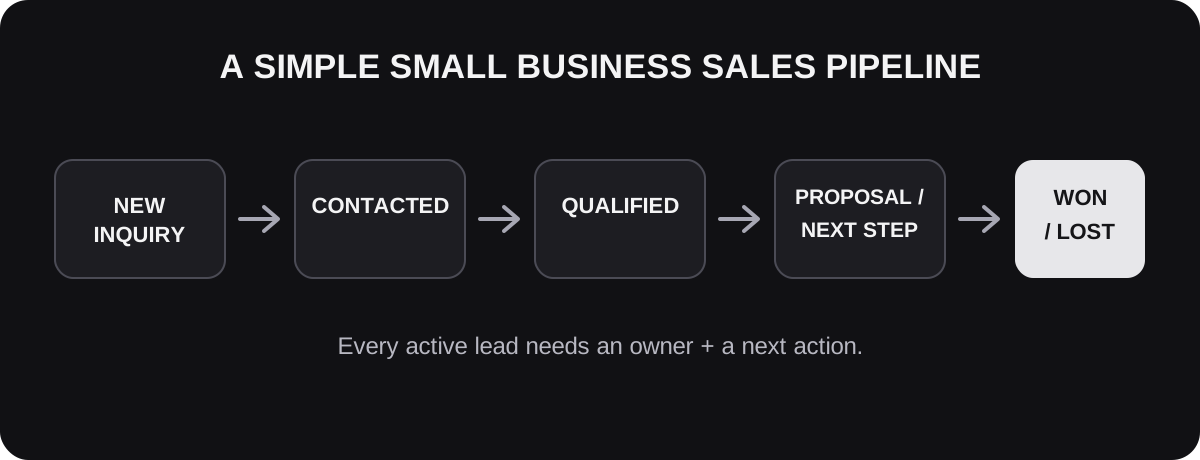
A simple seven-stage pipeline that works for many small businesses
Most small businesses do not need fifteen pipeline stages. Too many stages create false precision and make the system harder to maintain. A useful starting point is seven stages that can be adapted to the business's actual buying process.
The name of each stage matters less than the rule for entering and leaving it. Two employees should look at the same opportunity and place it in the same stage.
- ✓1. New inquiry: the lead has contacted the business but has not yet received a meaningful response
- ✓2. Contacted: the business has responded and is waiting for information or continuing the conversation
- ✓3. Qualified: the basic need, fit, timing, and relevant constraints have been confirmed
- ✓4. Next step scheduled: a consultation, estimate, demo, site visit, assessment, or other meaningful sales event is booked
- ✓5. Proposal or quote sent: pricing and recommended scope have been presented
- ✓6. Decision pending: the prospect has what they need and the business is waiting for a decision, approval, or final commitment
- ✓7. Closed: the opportunity is marked won, lost, or disqualified with a reason when known
Every stage needs an entry rule and an exit rule
A stage becomes useful only when it means something specific. If 'qualified' means one thing to the owner and something different to the salesperson, the pipeline numbers become unreliable.
For each stage, define what must be true before a lead can enter it and what event moves the lead out. These rules can be one sentence each.
- ✓New inquiry exits when a real first response has been sent
- ✓Contacted exits when the lead is qualified, disqualified, or stops engaging after the follow-up process
- ✓Qualified exits when the correct next sales event is scheduled or the opportunity is intentionally paused
- ✓Next step scheduled exits when the meeting, estimate, demo, or visit occurs or is cancelled
- ✓Proposal sent exits when the prospect declines, accepts, requests a revision, or moves into an explicit decision process
- ✓Decision pending exits when the opportunity is won, lost, or moved to a defined future follow-up date
Do not use stages as a to-do list
A pipeline stage describes where the buyer is. A task describes what the business needs to do. Mixing those two concepts creates messy pipelines such as 'Need to call,' 'Send follow-up,' and 'Waiting for reply.'
Keep the stage stable and attach the next action separately. A qualified lead can have a task to send available appointment times. A proposal-stage lead can have a task to follow up Friday. The stage tells you the sales position; the task tells you the operational action.
The most important field in the pipeline is the next action
A pipeline can look organized while still failing to move opportunities forward. The easiest test is to open any active lead and ask: what exactly happens next?
Every active opportunity should have one visible next action and, when appropriate, a due date. If there is no next action, the opportunity is usually stalled even if the stage looks healthy.
- ✓Call the homeowner Tuesday at 2 p.m. after the insurance adjuster visits
- ✓Send the revised proposal after receiving the final dimensions
- ✓Confirm whether the second decision-maker can join Thursday's call
- ✓Follow up two business days after the estimate
- ✓Request the documents needed before the consultation
- ✓Close the opportunity if there is no response after the final follow-up
Assign one owner to every active lead
Shared responsibility often becomes no responsibility. Even when several employees interact with a prospect, one person or role should own the opportunity at any given time.
Ownership means that person is responsible for making sure the next action happens. It does not mean they must personally perform every task. A receptionist might schedule the appointment while the salesperson still owns the opportunity.
- ✓Assign the owner when the lead enters the system
- ✓Define when ownership transfers between roles
- ✓Avoid leaving active leads unassigned
- ✓Make reassignment visible when someone is unavailable
- ✓Review overdue actions by owner, not only by stage
What information should each pipeline record contain?
Track enough information to understand and advance the opportunity, but do not turn the CRM into a form employees avoid updating. Required fields should earn their place by helping with sales execution, reporting, or customer experience.
For many small businesses, a lean record is more useful than a detailed record that nobody maintains accurately.
- ✓Lead or company name
- ✓Primary contact details
- ✓Lead source
- ✓Product or service of interest
- ✓Current pipeline stage
- ✓Opportunity owner
- ✓Qualification notes
- ✓Estimated value when useful
- ✓Last meaningful contact date
- ✓Next action and due date
- ✓Appointment, quote, or proposal status
- ✓Closed outcome and lost reason when known
Three pipeline examples for different small businesses
The correct pipeline should match the buying process. The examples below show how the same principles can produce different stage structures.
- ✓Home services: New inquiry → Contacted → Job qualified → Estimate scheduled → Estimate sent → Decision pending → Won/Lost
- ✓Professional services: New inquiry → Initial response → Qualified → Consultation scheduled → Recommendation/proposal sent → Decision pending → Client/Lost
- ✓B2B service business: New lead → Discovery → Qualified opportunity → Sales meeting → Proposal → Negotiation/approval → Won/Lost
When a spreadsheet is enough
A CRM is useful, but the sales process matters more than the software. A small business with modest lead volume and one or two people handling sales can often begin with a well-structured shared spreadsheet.
The spreadsheet should still behave like a pipeline. Use standardized stages, one row per opportunity, clear owners, next-action dates, and filters for overdue work. If the spreadsheet becomes hard to maintain, that is a signal that dedicated CRM software may now provide enough operational value to justify the switch.
When it is time to use a CRM
A CRM becomes more valuable as lead volume, team size, sales-cycle length, or number of communication channels increases. The goal is not to buy software because the business looks more professional with it. The goal is to reduce manual coordination and improve visibility.
- ✓Multiple employees regularly handle the same opportunities
- ✓Leads arrive from several channels and are difficult to consolidate
- ✓Follow-up tasks are frequently missed
- ✓The business needs automated reminders or workflow actions
- ✓Sales cycles last long enough that memory is unreliable
- ✓Management needs stage-level conversion or revenue reporting
- ✓Customer context is scattered across email, text, calls, and notes
CRM basics that matter more than advanced features
Most small businesses do not need to use every CRM feature. A few functions create most of the practical value: a visual pipeline, consistent fields, task management, contact history, basic automation, and simple reporting.
If employees need extensive training just to update an opportunity, the system may be too complicated for the current process.
- ✓Visual stage board or filtered opportunity list
- ✓Required stage, owner, and next-action fields
- ✓Activity history for calls, messages, notes, and emails
- ✓Tasks and due dates
- ✓Reminders for stalled opportunities
- ✓Simple source and conversion reporting
- ✓Permissions appropriate to the team
How to prevent leads from getting stuck in the pipeline
The biggest pipeline problem is often not losing leads. It is leaving them active indefinitely. Old opportunities inflate the pipeline, make forecasts unreliable, and hide the leads that actually need attention.
Create a stale-lead rule for each important stage. The rule should define how long a lead can remain without meaningful progress before a review or action is required.
- ✓New inquiries should never remain untouched beyond the business's response standard
- ✓Qualified leads without a scheduled next step should be reviewed quickly
- ✓Completed appointments should move stages promptly instead of sitting in 'scheduled'
- ✓Quotes and proposals should have a defined follow-up date
- ✓Decision-stage opportunities should have a real decision timeline or future follow-up date
- ✓Inactive prospects should eventually be closed, paused, or moved into a separate nurture process
Use closed-lost reasons to learn why deals disappear
Marking an opportunity 'lost' is not enough if the business wants to improve. Use a small set of lost reasons that describe the most common outcomes.
Keep the list short enough that employees can choose accurately. Too many categories create noisy data, while one generic 'lost' category teaches you nothing.
- ✓Not a fit for the service
- ✓Budget or price mismatch
- ✓Timing changed or project delayed
- ✓Chose a competitor
- ✓No decision / stopped responding
- ✓Could not reach the lead
- ✓Business capacity or availability issue
- ✓Lead solved the problem another way
The core pipeline conversion rates to track
A pipeline becomes much more useful when you measure how opportunities move between stages. You do not need dozens of metrics. Start with conversion rates that reveal where the largest drop-offs occur.
For each rate, divide the number that reached the later stage by the number that entered the earlier stage during a consistent time period. Use the same definitions every month so changes actually mean something.
- ✓Inquiry-to-contact rate: how many new inquiries received a real response
- ✓Contact-to-qualified rate: how many conversations became legitimate opportunities
- ✓Qualified-to-next-step rate: how many qualified leads booked the appropriate sales event
- ✓Appointment completion rate: how many scheduled events actually happened
- ✓Proposal rate: how many completed sales conversations or estimates received an offer
- ✓Proposal-to-close rate: how many proposals or quotes became customers
- ✓Overall lead-to-customer rate: how many total inquiries ultimately became customers
Related reading
Do not optimize the wrong stage
Pipeline data is useful because it separates different problems that can look similar from the outside. 'We need more sales' does not tell you what to fix.
If only a small share of inquiries are qualified, the issue may be targeting, positioning, or lead source quality. If qualified leads rarely schedule the next step, the process may contain too much friction. If proposals rarely close, the problem may be offer fit, pricing, trust, competition, or the sales conversation.
- ✓Low inquiry-to-contact: response coverage or lead capture problem
- ✓Low contact-to-qualified: lead quality or qualification criteria problem
- ✓Low qualified-to-booked: next-step friction, weak urgency, or poor follow-up
- ✓High no-show rate: scheduling, reminder, expectation, or qualification problem
- ✓Low proposal-to-close: offer, price, proof, sales process, or competitive problem
- ✓High 'no response' lost reason: follow-up quality or sales-cycle visibility problem
Track pipeline velocity, not only conversion
Two pipelines can have the same close rate but produce very different cash flow. One may move qualified prospects from inquiry to sale in five days while another takes five weeks because leads sit idle between steps.
Track how long opportunities spend in the pipeline and, when useful, in each stage. The goal is not to pressure customers into faster decisions. It is to identify avoidable delays created by the business itself.
- ✓Time from inquiry to first response
- ✓Time from qualification to scheduled next step
- ✓Time between sales event and proposal
- ✓Average time a proposal remains open
- ✓Total days from inquiry to won or lost
- ✓Number of days opportunities remain without a completed activity
A simple weekly pipeline review
A pipeline only works if someone reviews it. A short weekly review can prevent weeks of silent leakage without creating another long meeting.
Focus on exceptions and decisions rather than reading every opportunity aloud. The review should produce actions, ownership, and cleaner data.
- ✓Which new inquiries have not received a response?
- ✓Which active opportunities have no next action?
- ✓Which tasks are overdue?
- ✓Which leads have been sitting in the same stage too long?
- ✓Which proposals need a decision or follow-up?
- ✓Which opportunities should be closed, paused, or reassigned?
- ✓Where did the largest stage drop-off occur this week or month?
- ✓Which lost reasons are appearing repeatedly?
How managers should use the pipeline without turning it into surveillance
The pipeline should help the team execute better, not create meaningless administrative pressure. Requiring constant updates that do not improve the customer journey quickly teaches employees to treat the CRM as a reporting burden.
Use the system to clarify priorities, remove blockers, coach specific stages, and identify process problems. Measure outcomes and useful activities rather than rewarding people for creating the most notes or tasks.
What should be automated inside a sales pipeline?
Automation works best when the trigger and next action are predictable. Use it to keep records current and prevent routine steps from being forgotten, not to automate every sales judgment.
- ✓Create a pipeline record when a new inquiry meets defined criteria
- ✓Assign leads by service, territory, source, or team availability
- ✓Create a follow-up task when a lead enters a stage
- ✓Send appointment confirmations and reminders
- ✓Flag opportunities with no activity for a defined period
- ✓Move records after objective events such as a completed booking when integrations support it
- ✓Notify an owner when a high-priority lead takes an important action
What should not be automated blindly
Some stages require judgment, context, or sensitivity. Automatic stage movement based on weak signals can make the pipeline look clean while making the data less accurate.
- ✓Do not mark a lead qualified only because they opened an email or clicked a link
- ✓Do not auto-close valuable opportunities simply because a fixed number of days passed without reviewing the context
- ✓Do not let an automation promise pricing, availability, or scope that has not been confirmed
- ✓Do not remove human review from unusual, high-value, sensitive, or high-risk opportunities
How to estimate pipeline value without fooling yourself
For businesses with meaningful deal values, tracking the potential value of active opportunities can help with planning. But the total face value of every open lead is not the same as expected revenue.
A $20,000 proposal and an unqualified $20,000 inquiry do not have the same likelihood of closing. If the business uses weighted pipeline estimates, base stage probabilities on actual historical conversion data when enough data exists. Until then, treat pipeline value as directional rather than guaranteed.
A worked example: finding a hidden pipeline leak
Imagine a small service business receives 100 inquiries in a month. Ninety receive a response, 60 become qualified, 45 schedule an estimate, 40 estimates are completed, 32 quotes are sent, and 16 customers buy.
The overall lead-to-customer rate is 16%. That number is useful, but the stage data is more useful. The business is responding to most inquiries, and half of the quotes are closing. The largest avoidable opportunity may be between qualification and the completed estimate, where 20 qualified prospects disappear before a quote can even be produced.
Instead of immediately buying more advertising, the owner can investigate that transition: Is scheduling too difficult? Are appointment times too limited? Are people failing to show? Are reminders weak? Are qualified leads waiting too long for an estimate? The pipeline turns a vague revenue problem into a specific operational question.
A seven-day plan to build your first sales pipeline
You can create a useful first version in one week. Keep it simple, test it with real leads, and change stages only when the current structure fails to describe the actual buying process.
- ✓Day 1: map the real customer journey from inquiry to sale
- ✓Day 2: choose five to seven stages and write entry and exit rules
- ✓Day 3: define the required fields, owner rules, and next-action standard
- ✓Day 4: build the pipeline in a spreadsheet or CRM and add current active leads
- ✓Day 5: create follow-up tasks and stale-lead rules for each important stage
- ✓Day 6: choose the conversion rates and lost reasons you will track
- ✓Day 7: run the first pipeline review and clean every record with no owner or next action
Common sales pipeline mistakes
Most pipeline problems come from making the system too vague, too complicated, or too disconnected from the real sales process.
- ✓Using too many stages
- ✓Naming stages by internal tasks instead of buyer progress
- ✓Leaving leads without owners
- ✓Keeping active opportunities with no next action
- ✓Allowing stale deals to remain open forever
- ✓Changing stage definitions without updating the team
- ✓Tracking dozens of fields nobody uses
- ✓Measuring only total sales instead of stage conversion
- ✓Treating every lost deal as the same reason
- ✓Buying an advanced CRM before defining the sales process
Where Kinetic AI fits
Kinetic AI focuses on one part of the broader pipeline problem: inbound Instagram leads that need to be answered, qualified, followed up, and moved toward a booked call.
When Instagram is an important lead source, that activity should connect to the same pipeline logic described in this guide. The business should still know who the lead is, whether they are qualified, whether a booking link was sent, whether a call was scheduled, and what the next action is.
The software does not replace the entire sales pipeline or make closing decisions for the business. Its role is to help prevent qualified Instagram opportunities from disappearing before the human sales process begins.
Related reading
Final takeaway
A useful small business sales pipeline is not complicated. Every active opportunity needs a meaningful stage, one owner, one next action, and a visible outcome.
Build the stages around the real customer journey, define what each stage means, review stale opportunities, track conversion between stages, and investigate the largest drop-offs before assuming the business simply needs more leads.
When the pipeline is accurate, it becomes more than a sales tracker. It becomes a diagnostic system for showing where existing demand is turning into revenue and where it is quietly being lost.
Kinetic Growth Partnership
Build a more predictable online fitness coaching business
The Growth Partnership helps online fitness coaches identify the constraint limiting growth, build the missing strategy and systems around it, and review the numbers so the next priority stays clear.